
AI Flowchart Generator
Turn text, images, PDFs, or any of 45+ formats into professional flowcharts in seconds.
Trusted by professionals at
Use the AI Flowchart Generator in 3 Simple Steps
No design skills needed. Just describe what you want, and our AI flowchart generator handles the rest.
Start with any input - text, files, or URLs.
Type naturally, paste code, drop files, or enter a URL. Our AI understands 45+ formats including images, PDFs, Word, Excel, PowerPoint, and more.
- 45+ formats: images, documents, spreadsheets, presentations
- Images: PNG, JPEG, WebP, BMP, TIFF, HEIC, AVIF, SVG
- Documents: PDF, Word, Excel, PowerPoint, Markdown, JSON
Create a user onboarding flow...
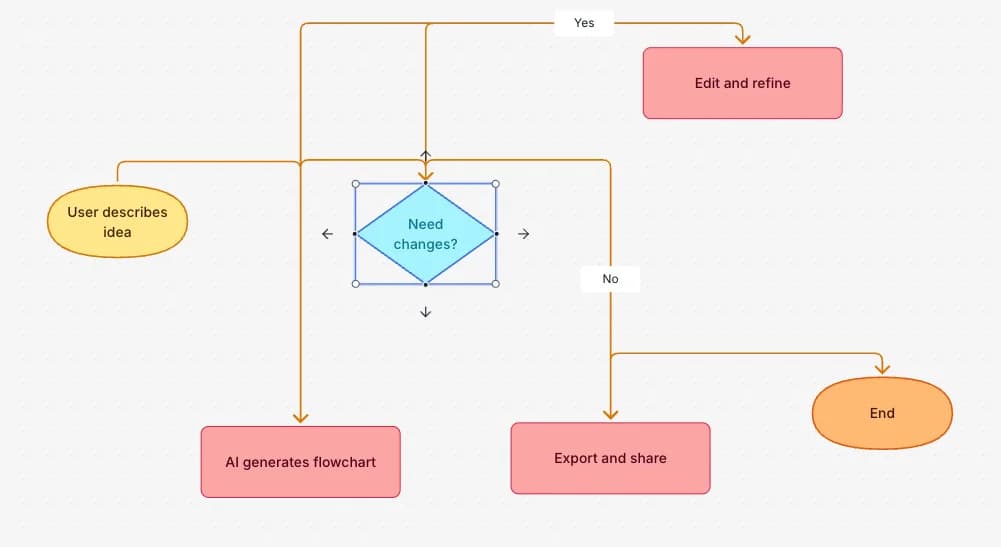
The AI flowchart generator creates your flowchart instantly.
Watch as the AI flowchart generator transforms your input into a structured flowchart with proper shapes, logical connections, and clean layout.
- Smart shape selection for each step type
- Automatic connections and flow logic
- Real-time preview as it generates
Edit, style, and export your way.
Fine-tune every detail of the AI-generated flowchart with drag-and-drop editing, choose from 40+ color themes, and export in multiple formats.
- 40+ professional color themes
- Drag-and-drop node editing
- Export as PNG, SVG, or Mermaid code
Everything you need in an AI flowchart generator
Powerful features that make AI flowchart generation fast, flexible, and beautiful.
45+ Input Formats
Images (PNG, JPEG, WebP, BMP, TIFF, HEIC, AVIF, SVG), documents (PDF, Word, Excel, PowerPoint), text (Markdown, JSON, CSV), and URLs.
Full editor, zero learning curve
18+ shapes from basic rectangles to decision diamonds. 5 edge styles to match your design. Drag to connect, double-click to edit.
AI Chat Agent
Refine your flowchart with natural language. Add nodes, reorganize structure, or fix logic—the AI understands context and makes precise edits.
Presentation-ready in one click
Vibrant, calm, monochrome—pick a theme that matches your brand. Every color is carefully tuned for clarity and contrast.
PNG, SVG, Mermaid, or share link
Download for slides, embed in Notion with Mermaid code, or share a public link—recipients view instantly, no sign-up needed.
Built for Efficiency
AI flowchart generator features designed to save you time and effort.
One-Click Auto Layout
Messy diagram? Click once and watch it transform into a clean, professional layout.
40+ Free Templates
Business, tech, HR, marketing—start from professionally designed templates.
Cloud Sync & Auto-Save
Your work saves automatically. Access from any device, never lose progress.
Keyboard Shortcuts
Undo, redo, copy, paste, delete—all the shortcuts you expect, just work.
Frames & Grouping
Group related nodes together. Export individual frames as separate images.
Mermaid Import & Export
Import existing Mermaid code, edit visually, export back. Full round-trip support.
Free Flowchart Tools
Convert text, images, code, and documents into beautiful flowcharts instantly. All tools are completely free.
View all toolsText to Flowchart
Convert text to flowcharts with AI
Image to Flowchart
Convert images to editable flowcharts
Mermaid to Flowchart
Convert Mermaid code to visual diagrams
PDF to Flowchart
Convert PDF documents to flowcharts
URL to Flowchart
Convert webpage content to flowcharts
Code to Flowchart
Convert programming code to flowcharts
Frequently Asked Questions
Everything you need to know about Flowova's AI flowchart generator
Ready to Try the AI Flowchart Generator?
Join tens of thousands of professionals who use Flowova to visualize their ideas. Start creating flowcharts with AI in seconds.
Get Started Free